
What are UTM parameters?
UTM parameters provide more and better insight into the results of your online marketing. Are you already using these parameters (correctly)? Or do you have questions about how these parameters work and how to use them correctly to gain insight into your results in GA4 (Google Analytics)?
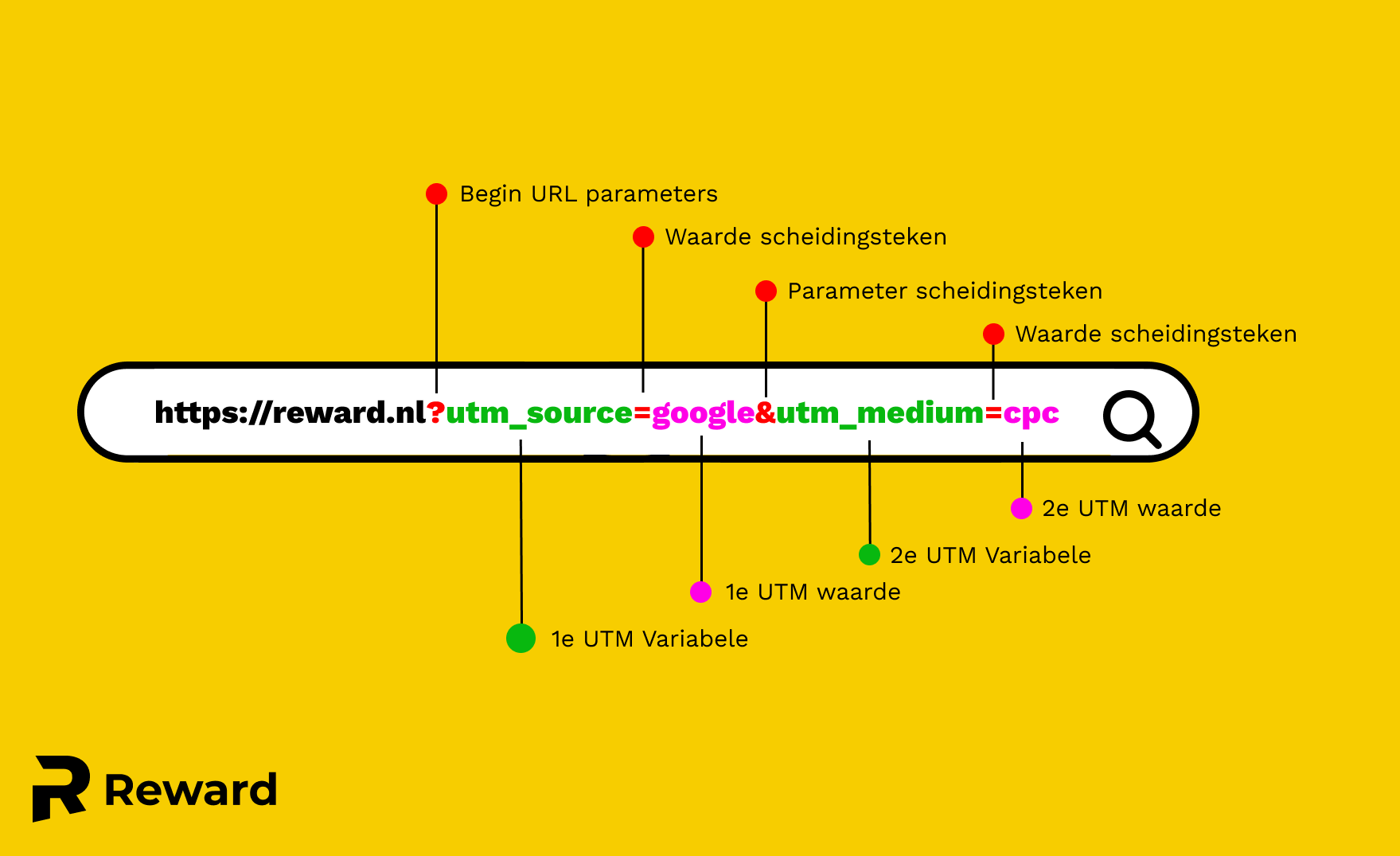
To use UTM parameters effectively, it is essential to understand what these parameters do and what they look like. Take a look at the image for a clear picture of what these UTM parameters look like in the URL structure.
The image below shows the following:
- https://reward.nl: This is the landing page, in this case the homepage that the user arrives at.
- ?: Indicates that the text that follows consists of URL parameters.
- utm_source: Represents the first UTM parameter.
- &: The "&" sign is used to separate different parameters from each other.
- utm_medium=cpc: This is the second UTM parameter.
This example shows the parameters "utm_source" and "utm_medium." These are two of the most important UTM parameters for GA4. However, there are many more UTM parameters available. Would you like to learn more about the different parameters and which ones are relevant to you? Please continue reading.
What UTM parameters are there for GA4?
utm_source (Required)
This parameter indicates the source of the traffic, such as the website or platform that referred the visitor to your website.
Examples:
utm_source=facebook: if the visitor arrives via a link on Facebook.
utm_source=newsletter: for traffic from an email newsletter.
utm_source=google: for traffic from Google Search.
utm_medium (Required)
This mandatory parameter describes the marketing medium, such as email, banner, or cost-per-click (e.g., Google ADS).
Examples:
utm_medium=cpc: for paid search results.
utm_medium=email: for email campaigns.
utm_medium=social: for social media referrals.
utm_campaign
Specifies the specific name of the campaign or promotion. This helps to distinguish between different campaigns within the same source or medium. This gives you insight into which campaigns are performing well and which are not.
Examples:
utm_campaign=fall_sale: for a fall sale promotion.
utm_campaign=2023_summerdiscount: for a summer promotion in 2023.
utm_campaign=ebook_download: for a campaign promoting an eBook promotion.
utm_term
Used for paid search ads This parameter identifies the search term someone entered before clicking on the ad (the search query in Google, for example).
Examples:
utm_term=leather+jackets: if you advertise leather jackets.
utm_term=cheap+sneakers: for an advertisement about cheap sneakers.
utm_term=GA4+tutorial: for a tutorial on GA4.
utm_content
This allows you to distinguish between different ads or links that refer to the same URL, which is useful for A/B testing or if you have different call-to-action buttons.
Examples:
utm_content=headerlink: for a link in the header of a website or email.
utm_content=footerlink: for a link in the footer.
utm_content=sidebanner: for a side banner advertisement.
It is important that you are consistent with the values of your parameters, otherwise you may encounter errors in your GA4 reports and you will not have a realistic picture of your website visitors and/or conversions. That is why we recommend keeping a UTM parameter sheet. We will tell you more about this later!
How do you add UTM parameters to advertising channels?
All these parameters are very interesting, but how do you implement them and add them to your advertising channels?
You can easily add the UTM parameters to the landing page URL, but you can also use the options within the advertising platforms to fill in the UTM automatically. Below, we highlight the two most commonly used platforms and explain how you can add these parameters.
Adding UTM parameters to Google Ads
- Go to your Google Ads account
- Navigate to account settings
- Then go to ‘track
- Under "final URL suffix," enter the UTM parameters you want to add to all your ads in your Google account.
For example, you can use the following suffix:
utm_source=google&utm_medium=cpc&utm_campaign={campaignid}&utm_content={adgroupid}&utm_term={keyword}
5. Please note! Always test before saving these changes.
6. Have all tests been successful? Then click on save.
Adding UTM parameters to Facebook Ads
- Create a new campaign, or go to an existing campaign
- Go to the advertisement(s)
- Scroll down to track
- Under URL parameters, enter the desired parameters for this advertisement.
For example, you can use the following formatting:
utm_source=facebook&utm_medium=cpc&utm_campaign={{campaign.id}}&utm_content={{ad.id}}
Practical Tips on UTM Parameters
Maintain UTM parameter sheet
When you start using parameters, it is important that all parameters are used consistently in order to continuously collect the correct data.
Therefore, always keep track of the parameters you have used (in a Google Sheet, for example). That way, you (or your colleague) will know exactly which parameters to use or add. To help you get started, we have included a link below to a sheet that you can use to keep track of your parameters.
Copy a UTM parameter template here
Add custom channel groups in GA4 based on UTM parameters
Do you often use the standard channel groups in Google Analytics? But is there no standard channel group that suits your situation, for example because you use UTM parameters to gain insight into the results of your offline marketing?
Then you can add a custom channel group. See the step-by-step plan below for instructions on how to do this.
- Go to management:
- Under the property column, navigate to data settings>channel groups.
- Then click on "create new channel group."
- Create your custom channel group with the conditions that apply to you.
What makes UTM tagging interesting for you?
As you have already read, this blog focuses on "measuring is knowing." Only when you have insight into all data regarding visitors, conversions, and the performance of your online and offline campaigns can you make the right adjustments. Our Google ADS experts are passionate about analyzing this data and know how to optimize your campaigns through analysis. Are you ready to get the most out of your conversions? Then contact Lester, our tracking expert.
